Keysight Connection Expert
Problem:
A previous redesign of Connection Expert modernized the user interface (UI) elements but in the process introduced new workflows and a new system model that did not match the user's mental model for instrument connectivity and hindered the user's transfer of learning.
Challenge:
Redesign the user interface of Connection Expert to match the mental model for instrument connectivity while keeping the modern UI elements.
Introduction
Keysight Connection Expert (KCE) is a free-to-use software provided by Keysight Technologies that allows users to discover and connect to instruments. It is also used for updating instrument drivers and allows for soft front panel access. An integral product for test and measurement engineers, KCE averages about 10,000 worldwide downloads a month. For more information and to download KCE, please click here.
Instruments consist of actual hardware (e.g., oscilloscopes, spectrum analyzers, function generators) that are connected to a PC (test station) via different interfaces: USB, LAN, GPIB.
Primary users of KCE consistent of electrical engineers who want to connect to an instrument, verify connection status, and communicate with the instrument for design, test, or manufacturing purposes.
Investigation
The first step was for me to understand the common use cases a typical user would undertake. I interviewed users of the software to understand what they typically used KCE for and asked them to demonstrate their tasks following the think-aloud protocol.
The main use cases were broken down into the follow tasks:
1. Verify an instrument is connected to their PC (most common)
2. Leverage the connection strings provided by KCE to use in their own code when testing with respective hardware
3. Use KCE to open other tools provided in the IO Library Suite to monitor traffic, send commands, or interact with instrument
One consistent line I heard while talking with users was "I wish it would go back to the way it used to be.”
Throughout this process I worked closely with the support engineers who provided background and guidance in understanding the technical implementation and reasoning behind certain designs as well as insight into real-life use cases.
Following the interview, I took a look at the design of KCE v17 and the previous version KCE v16 (shown below). I played around and looked at the layouts and design of the UI to identify areas of improvement. User feedback from the interviews provided helpful information to identify problem areas that could be easily improved.
Areas for Improvement
Two areas I'll focus on here for immediate improvement included:
1. Layout and organization of instrument list
-
All connected instruments on LAN showed up on user's list. For a large lab with many instruments, everything would show up even though the user only cared about their instruments and their list
-
No way to tell quickly tell interface connection- users missed the tree view that was a staple of the UI for the past couple versions
2. Connection status and interaction with individual instruments
-
Wanted to quickly see what the connection status of the instrument was
-
Right-click availability for quick actions were not implemented
Design Process
Instrument List
Common complaints from the participants interviewed indicated that the layout and organization of instruments was confusing. All instruments would populate on the screen, regardless of whether or not they were owned or used by the individual. For example in a large lab with many instruments connect via LAN on the network, all those instruments would show up, regardless of whether the user wanted them to show up or not. A temporary fix was made in KCE v17 to let users "star" their instruments and toggle their view between "all" and "favorites".
After discussing this issue with the team, a decision was made to have the user manually add LAN instruments to the instrument list, while anything that was directly connected to the laptop, via USB for example, would always show up on the instrument list. To help facilitate this model to the users, we redesigned the instrument list to group instruments by their interface. This would be similar to the "tree view" that more experienced users were expecting.
Once an instrument was added to the list, it would stay there indefinitely until removed. This would help prevent users from being overwhelmed with tens if not hundreds of instruments showing up on their list, and them having to hunt for specific instruments they owned.
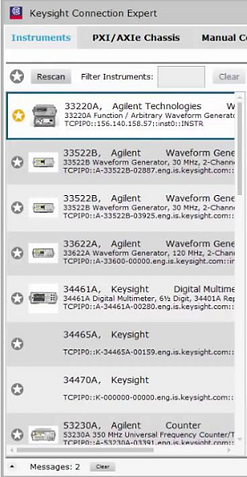
KCE v17 Instrument List

KCE v18 Instrument List
Connection Status
The most common goal users have when using KCE is to verify their connection to an instrument, and if not connected, to then connect the instrument.
In KCEv17 the only way to tell if an instrument was connected was to first click on an instrument then once the details pane updated to show details of that instrument, could users see a green check mark in the Connection String section.
To address this issue and accommodate quick scanning, we added a green check to indicate connected instruments and a red "x" to indicate disconnected status. If an instrument was previously manually added to LAN but was currently disconnected, then it would not show up on the list at all.
Verification Process
For each these ideas, quick sketching was done for quick concept creation and moved to PowerPoint for low-fidelity prototypes to show to target users and developers for quick feedback.
Once developers had created a front end UI to reflect certain changes, I would take these early prototypes and verify the designs with proxy users (internal Keysight employees who used KCE) and gather feedback and create a report that detailed what worked or didn't work and provide recommendations to finalize or adjust elements of the UI back to the project team.
Once a final UI design was settled upon and an early working alpha and beta versions of KCE v18 were available, formal usability tests were held in which I would gather contextual information from KCE users and their use cases, then present the new KCE version and have these users walkthrough their everyday use cases. WebEx was used to record and show the laptop screens to other members of the team to allow them to observe the participant actions. Following each study, I then created a report that consisted of the participant's background, use cases, and my observations that verified improvements, as well as provided recommendations for future enhancements.


Comparison between KCE v16, 17, 18
What I Learned
-
A "modern" look and feel isn't as important as matching the user's mental model.
-
Always take into account transfer of learning; do not expect users to eventually learn a new workflow and get used to it eventually.
-
Listen to your users! Consistent feedback from users is great ammunition when dealing with developers or designers who are solely focused on a specific design or implementation.
-
Empathize with users. Lending an empathetic ear and simply giving users an opportunity to vent and feel listened to will not only provide opportunities for improving your application, but help them invest and feel more connected to your company and your products.
Where is KCE now?
-
KCE is doing well and is now on version 18.3, adding bug fixes and new enhancements to users.
-
A cross-platform version of KCE is available internally and to select customers with a UI update, but kept the use model intact for easy transfer of learning for users.