Visualizations for Movie Production Studio Heads
Information Visualization Class Project
Gustavo Arango, Derek Ho
The task for this project was to visualize information for any subject we wanted. With a natural interest in movies, our team wanted to focus on a movie preproduction process. "What kind of movies underperformed at the box office? What kind of movies outperformed expectations? What kind of influence did directors, plot, or genre factor into performance?"
The purpose of the class was to learn about different methods of conveying and designing information. This project was the culmination showcasing a portion of the methods we learned in class into an entertaining tool for movie fans to peruse as they imagined themselves as movie studio heads trying to 1) identify movies which performed well, 2) identify key subjects or themes that performed well, and 3) identify directors who could merge these subjects together and perform on a consistent basis.
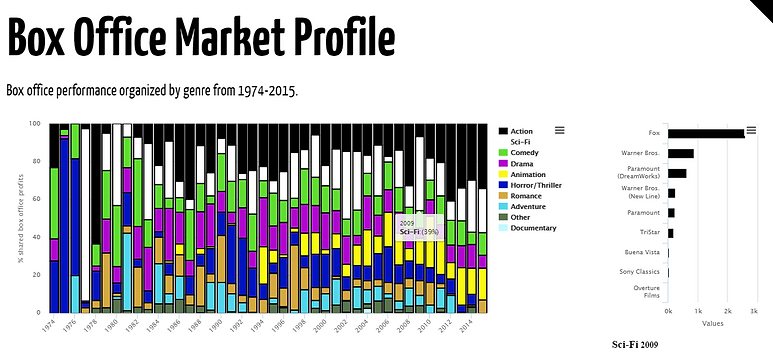

Compare box office market performance by genre
This page is to give users an idea of trends in certain genres within the movie industry, such as the increase in Animation beginning around the 90s (yellow bar) due to technological improvements.
Compare the box office performance by genre over time (x-axis). To view more details, sections can be selected to bring up an interactive table containing movies that fall within that genre and year. This table can be sorted and linked to a respective movie's IMDB page.

Identify similar plots and storylines from existing movies
This visualization serves to provide users a way to input keywords from their plot and compare it to existing movies containing similar key words in their IMDB description. Users can use this tool to view how similar keywords in movies performed in the box office as well as their critical rating.
The best-matching movie is shown along with referential information and the plot description. A node-link diagram showing the best matching 20 movies along with respective links to their related movies (can be adjusted via % slider).
The blue node indicates the user-entered plot, red to black indicate high to low box office performance, and size of node indicates critic rating (larger is better).


Identify directors based on desired budget, rating, box office gross
With a script in hand it is now time for the user to determine which director is right for them. This visualization provides users with the ability to crossfilter the entire database of movies to identify a pool of directors based on a desired budget, rating, and box office gross.
A word cloud displays the resulting directors with larger names indicating average box office gross and a darker-colored name indicating average rating of movie.
Selecting a director name displays bar charts showing the previous rating and profit data for previously-directed films, as well as update the table to allow for more advanced sorting.