
Dell UltraSharp Webcam
Challenge:
Design Dell's first-ever webcam on a compressed timeline.
Role:
Lead UX Engineer
Introduction
During the height of COVID, collaboration and remote work experiences became the "new normal". With the need for tools to help communicate remotely and the desire to connect virtually, the demand for webcams skyrocketed. Dell decided to enter into the webcam market and look to create their first external webcam.
Our peripherals team was tasked with a mandate to design a webcam and release it within 8 months from concept to launch (normal programs take ~16-20 months). This left less than 2 months for the front-end research and design work before tooling occurred. This undertaking became a priority and considering there had been no previous webcam program, was a considerable task our team had to take on. While it was a difficult program, I did learn a lot from this process that I would like to share below.
My role on this program as the lead UX engineer was to provide the best experience our customer would have with this webcam from the initial out-of-box experience and the webcam setup, to the software experience and auto framing behavior. I worked closely with industrial designers, marketing planners, engineers, and software developers to ensure that these use cases were thoroughly clear and understood. I worked with webcam users to test our hardware and gather feedback and insight to iterate and improve on our hardware, software, and image quality of our webcam. I looked to understand the different scenarios, habits, and pain points attributed towards webcams by our premium users and look for solutions we could implement to fix and solve these problems.
In the following breakdown I will touch upon my research, hardware design and testing, firmware design and testing, and software processes I followed to deliver this product. Please note that I will only highlight a few features (out of many) that give some insight into my design thinking and how I undertook this project.

Dell UltraSharp Webcam
Research
Understanding the Users
Initial research in the space of workspace collaboration found that for webcam users there were a few types of groups we could bunch users into:
1. Users who were happy with the default webcam in their phones or laptops (the casual user),
2. Users who wanted a dedicated external webcam at a reasonable cost (the mainstream user),
3. Users who wanted to be seen and presented clearly and sharply (the executive user),
4. Users who wanted the newest and most up-to-date technology/gadget (the technologist).
Further research found that while there was high market saturation for webcams catered to those in group 2 (the mainstream webcam users), there was a significant gap in the market for 4k-resolution webcams that allowed us to narrow in and focus on a premium device that provides best-in-class image quality. By identifying the positioning of this product, we were then able to focus on our main users falling within group 3 (the executive) and group 4 (the technologist).
User Research
Interviews and user studies targeting these personas were conducted to understand webcam usage behavior as well as a benchmarking of existing competitor webcams. Goals for these studies was to understand the total collaboration experience, not only from a webcam/video perspective, but also from an audio/speaker perspective to make sure we understood workspace collaboration usage from a holistic level.
The main use cases which were identified by participants to be crucial in the usability of a webcam were:
1. Webcam set up (hardware and software); webcam users want plug-and-play and easy-to-set settings
2. Flexibility dependent on user environment for video quality (lighting) and audio usage (speaker vs headset)
3. Manual privacy control that is easy to detect if camera is covered or not
These interviews also helped us identify qualities and features expected with a premium product. From a hardware perspective, top-of-the-line camera sensors were identified to provide that DSLR-like visual quality. Premium materials were identified to provide a next-level quality build when holding the device in a customer's hand. Software features were identified to provide a seamless experience when setting up the webcam and enabling innovative experience like auto framing on a subject and presence detection for those worried about security and privacy. A prioritization of features then naturally began to form based on what were must-haves (plug-and-play, privacy) and those that were more nice-to-haves and not core to the individual experience (horizontal swivel).
Hardware Design and Testing
Hardware Design
Once customers and use cases had been identified, I worked with our talented industrial design team to brainstorm concepts we could bring forward for hardware design. Concepts ranged from the traditional (webcam on top of a monitor), to the more extravagant (mobile webcam that could be mounted or placed in front of the monitor to help the presenter maintain eye contact). Ultimately mainly due to the limited time for concept research and technological restrictions we were faced with, the traditional webcam on monitor concept was chosen to move forward as our main form factor.

Dell UltraSharp Webcam on both tripod mount (L) and monitor mount (R)
Standard practices were identified from competitive and user research for the behavior we wanted to have on our webcam. One good example is the shape and structure of the mount. We wanted the usage to be similar to the flip mount that is found on traditional webcams- a traditional webcam mount that customers could pick up and easily understand how to set up and use. In our studies we did also find that a sizable portion of webcam users placed their webcam on a tripod or camera arm, so we designed for a magnetic attach which let the user detach the webcam from the monitor mount to allow it to be placed on a tripod mount to accommodate for the various other mounting use cases while still providing a clean and elegant look.


Comparison of "notch" overhang with Logitech Brio (L) and Dell UltraSharp Webcam (R)
Another area of improvement we designed was the removal of the "notch" when the webcam mount hangs over the bezel of a monitor and interferes onto a screen. With the trend on monitors moving towards minimal bezel (if not removing completely), the goal was to accomplish a mount design that was just as stable but also would help remove the footprint from the front of the screen. While there was less surface area on the front of the monitor for the mount to hold on to, we found that the weight of the webcam actually helped add more pull on the contact point to contribute towards the stability of the webcam.
Hardware Behavioral Specification
For each hardware product we make, there is a behavioral specification that is released that dictates the experience each customer should have when interacting with our product. These specifications are important since they are used by our engineering team to ensure the mechanical experience is ideal to the customer expectations and tested and checked against during the manufacturing process to ensure consistent behavior for our products. Examples for this webcam ranged from specification of the angle of vertical tilt to the magnetic attach/detach force when remove the webcam from the magnetic mount.
Since this was our first webcam product, we did not have any existing specification for this type of product. As the UX engineer I had to identify each area that needed to be addressed and create specifications to ensure that engineering could check the product against. These values were first leveraged by comparing against competitor devices and then further tuned and iterated based upon feedback from users studies and internal findings.
Hardware UX Testing
Once we had early mockup samples of the webcam, we conducted hardware usability testing to validate the hardware design. Particular focus was held for the unboxing and webcam set up for both monitor and tripod use as these were the areas where "high-touch" usage of the webcam would occur. While feedback was generally positive and the webcam had a "premium" design, there were some areas that needed to be tuned and adjusted:
1. Magnetic attach force of webcam to the mount was not strong enough when user tried to tilt past vertical tilt distance
-
Solution: Increase the magnetic force requirement specifications
2. Socket to plug had some irregularities which contributed to not plugging cable fully in on set up
-
Solution: Chamfer socket to allow for more smooth entry. Reduce the tolerance of the socket plug to prevent less chance for resistance when plug is inserted.
3. Some participants initially tried to attach the webcam to the mount backwards
-
Solution: Shape the connection insert and hole between the mount and webcam to be visually more obvious on how to connect.
This feedback (among others) was the condensed into a report I presented to the stakeholders, particularly the engineering and design team to look at areas we could address and improve upon. Needless to say at this point, our first product sample was not perfect, but a good example and reminder to the team as to why usability studies are needed and how design is an iterative process that we should use as an opportunity to learn from. Further studies with subsequent samples included visual quality, firmware, or software portions that will be addressed in those respective areas below.

Dell UltraSharp Webcam with mount, cable, and privacy cap separation
Firmware Design, Specifications, and Testing
Visual Quality
To understand what visual quality we wanted to provide to our users, I worked with the visual engineer and marketing planner. We identified presets that could be used as starting points for new users to easily set up their webcam. We also identified image settings that could be available to users for and how their expected behavior should work. To further understanding, we paired with an outside vendor who had extensive visual quality experience and could provide an objective evaluation of the image quality and what we could do to improve upon it. We then tested image quality against competitors to iteratively check our progress to make sure our visual quality was premium. Attributes related to image quality were used as parameters (i.e., brightness, clarity, saturation) and participants scored on a "just-right" scale where scores ranged from 1 (too low) to 5 (just right) to 9 (too high). In addition to the parameters, overall scores and rankings were also asked to ensure to track our performance relative to our competitors. Based on the results from user testing, visual quality was tuned accordingly. This was a particularly fun experience to go through as one of our early firmware versions was hilariously oversaturated, resulting in an awkward sunburned look for those with paler skins.
Presence Detection
Since this was a premium device, we wanted to investigate ways in which we could differentiate this product from the rest of the competition. User privacy was a core tenet we had identified from our user research. One solution we had was to leverage our Dell ecosystem and provide additional security features for customers who had both a Dell laptop/PC as well as our webcam. To further understand how this would work on a technical level I worked with our Advanced Engineering team to understand the technology behind the architecture and sensor technology to define behavior for detecting user presence (or absence) to trigger PC lock, PC wake, and facial recognition.
I created storyboards and specifications for how the ideal behavior around this feature would work and iteratively improved it as we learned more and more about this feature. Factors like technological capabilities (e.g., sensor tracking distance, field of view), user behavior (e.g., intention to turn on PC or just walking by), and consideration of various use cases (e.g., multiple presence sensors prioritization, privacy control) all played a part in the eventual design and functionality of this privacy feature.
UX testing was held in which participants discussed and played around with presence detection. Because presence detection is a relatively new feature, many participants were unfamiliar with the technology but had no trouble envisioning the various use cases they would need it for. It should be noted that the POC sample we had for testing was having some issues as this was a rushed prototype and the task performance scores we received were not good. Despite the low score, the concept reception by the participants helped validate the use case, but still reinforced the idea with the team that the implementation of this feature in the actual product needs the performance to be foolproof. It also helped reinforce the idea to upper management that novel ideas and features need time to implement, both from a behavioral and engineering perspective.
Auto Framing Specification
This was a more challenging specification to define and create. To help provide visual understanding of what concepts I wanted our auto framing feature to have, I created storyboards to indicate subject behavior and subsequent camera framing action. Lots of collaboration was required between myself and the firmware engineers to make sure that action followed according to spec and was tuned correctly. Iterative improvements came out on an almost weekly basis to help ensure that the spec was followed, and any areas of uncertainty had to be further included in the spec to make sure it covered all the various use cases (multiple subjects, subject distance, head micromovements, etc.) or technological boundaries.
One interesting question I had during this study was the differences or similarities in perception of this feature from the subject and audience perspective. From the subject perspective, because a speaker often looks at their face in a collage of faces, I didn't want to present a view of themselves and become distracted by their camera constantly moving and adjusting to their head placement. Similarly from the audience side, I didn't want them to become distracted, or worse, get some kind of dizziness or motion sickness from the presenter's background constantly moving around. Thus tuning the speed and sensitivity of the auto framing was a challenging but fun specification I made.
For UX testing, we tested participants in both the subject and audience roles. We found that majority of participants were delighted by this feature and intrigued particularly if they had to do a demo of a product. Areas of improvement were the ability to improve the fluidity of the framing, as well as the ability to allow the user to set their own customizable speed/sensitivity/frame, features that we are currently working on for our Auto Framing 2.0.
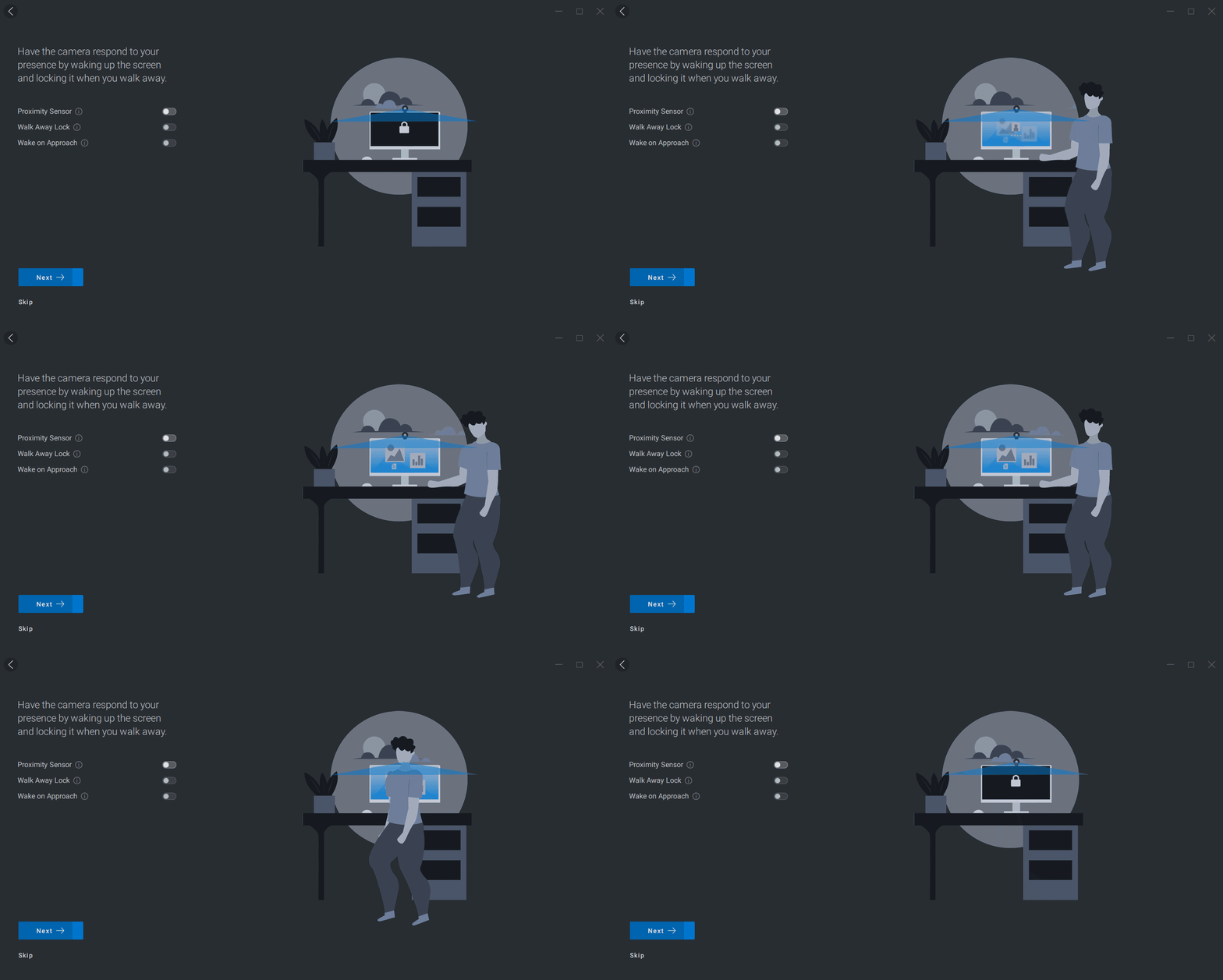
User Presence Detection Walkthrough Page (DPM)
Software Design and Testing
One of the goals for this program was to have a seamless experience between hardware and software. This was most important in the initial set up stage when our studies found that most webcam users play with the settings here and then "set and forget".
To ensure our customers would be able to easily set up and run our software with the level of customization they wanted, I worked with the UI designers to help them understand the user behavior and create a walkthrough that highlighted key features as well as in the general design and behavior of the webcam settings UI.
Walkthrough
In terms of software, one pain point that participants from our user studies identified was the ability for a plug-and-play webcam. One that needed little (if any) software interaction. Another nugget of information we found was that webcam users very rarely adjusted their visual settings via software. To help prevent new users from becoming overloaded with all the fancy features but ensure that they were able to set themselves up for a good usage experience with our webcam, a walkthrough was created to help guide new users who installed our software.
We didn't want to overwhelm users with a walkthrough containing all the possible settings that they would need, so a prioritized list of features were identified and storyboards were created so the team could understand what the user would face. I then worked with the UI designer to make sure that the behavior we were desiring for the experience settings matched up with the UI that was being designed.
Settings UI
For software, Dell uses Dell Peripheral Manager (DPM), a software platform that is used for peripherals traditionally for showcasing status and for firmware updates. It was identified early on in needing a significant redesign in order to handle the walkthrough and amount of settings we wanted to incorporate with our webcam. Based on findings from the user studies I categorized the settings and worked with the UI designer to come up with a structure we could use for the software.
Storyboards and mockups were created and discussed with the SW development team to discuss implementation of features and whether they were technically feasible in the amount of time we had. Due to the architectural upheaval, lots of communication and back and forth was required between the software, engineering, and UX team in the development of the software.


Dell Peripheral Manager (DPM) Settings Page
Software UX Testing
The team ran a round of UX testing with the webcam specifically focused on the software experience- particularly during the set up experience with the walkthrough and user understanding of what basic setting and features were presented.
Some issues that were identified and presented to stakeholders for improvement were:
-
Creating a new preset interaction starts with default values.
-
My solution: When creating a new present, instead of creating a new preset from scratch, leverage from the existing user settings. Findings from our user research indicated that participants liked to have a "starting point" and incrementally adjust from there.
-
-
Settings UI group boxes constantly open and close automatically
-
My solution: Group boxes should not automatically open and close but should remember their state and be manually controlled by the user.
-
-
More clarity and information on what each setting does.
-
My solution: Add more information bubbles to each setting that clearly defines the expected behavior for this setting.
-
These issues are pretty basic findings that all software controls should have, but based on the speed of implementation were missed and behaviors not followed by the developers. Luckily we had enough time to iterate and make the appropriate changes and adjustments to the software UI. Admittedly, the software is not perfect and we are limited by the software architecture, but the process for design, evaluation, and improvement was able to be followed to allow for improvement.

What I Learned
-
Don't rush the process
-
Whether it is the front-end research and design process, or the software development process, these things take time to make it right- especially if designing a new form factor, or redesigning your software platform.
-
There are a lot of changes we would have liked to have time to iterate and improve upon, but due to limited time for hardware and software development, we had to settle for what was "good enough" based on testing and best industry practices. Even though we would like to have a solid design process, learning to prioritize is one of the best ways to handle these kind of tradeoff situations.
-
-
Understand your users
-
For this premium product there was a constant temptation for feature creep and concern over corner use cases.
-
By framing around our main use case- executives and technologists for individual , desk-based webcam use, we were able to prevent added and needless features to the webcam that wouldn't have added as much value as desired and saved time from investigating those features.
-
-
Communicate with your stakeholders
-
Throughout this project lots of functions were working in parallel; the amount of decisions that were reverted and changed was particularly challenging to deal with in this program and required everyone to constantly be on the same page for each decision point.
-
This turned into a lot of churn and required teams to need to revisit and change assumptions based on earlier decisions that were made.
-
Constant communication and check-in was required and establishing a rapport with your fellow teammates helped contribute towards a successful team effort.
-
I acknowledge these are all very basic and broad learnings, but going through this program at such a fast pace just reinforced how important these tenets need to be remembered and followed by a designer or researcher at any level and preached to the whole team to contribute towards a smooth and successful project.
Where is this product now?
The Dell UltraSharp Webcam was released in July 2021 and was a Gold Winner for the Spark 2021 Design Awards. Chosen as Dell CSG's product of the year for FY2021.
Find more information about the Dell UltraSharp Webcam on the Dell website here.